
Bazel Starlark Docs on the Registry
Improving how to publish and find Bazel documentation
Fixing Bazel!
About a year ago, I wrote about Bazel’s “stardoc” API documentation generator In https://blog.aspect.build/experiment-with-buf-and-starlark-docgen.
I didn’t make any public announcement at the time. This past year I’ve been continuing to evolve the design, and I’m excited to have finally launched it!
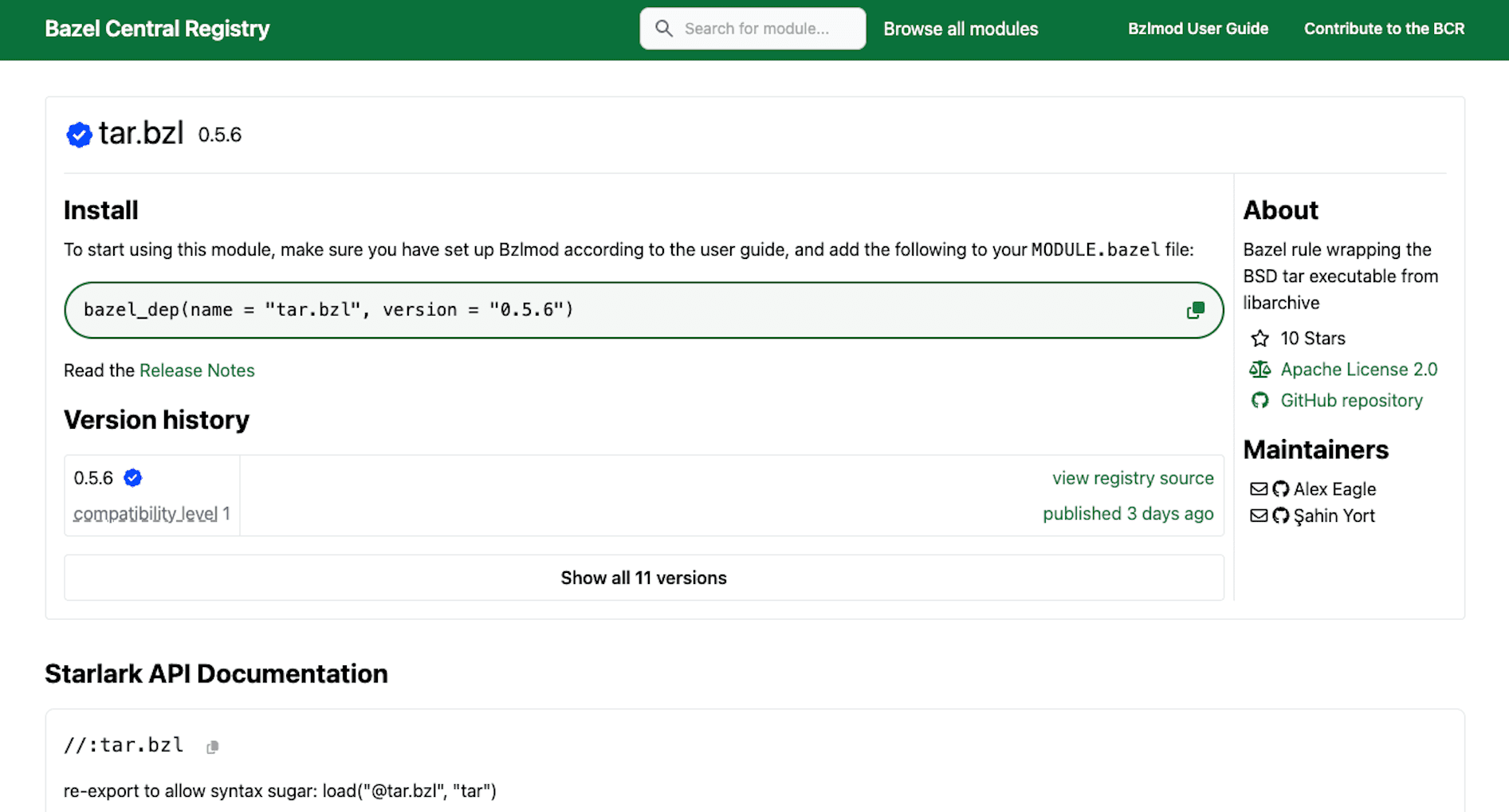
For example here is https://registry.bazel.build/modules/tar.bzl:

Documenting Bazel APIs
Some documentation for the Bazel “core” appears on https://bazel.build. However Bazel is extended by rulesets which are published as modules. How do developers find the API documentation for these?
The answer has been quite fragmented, with the community taking several approaches:
Markdown or ReStructured Text files checked into the repo like https://github.com/bazel-contrib/rules_go/tree/master/docs/go/core. These rely on some testing that the checked-in files match the stardoc output. So a
stardoc_with_diff_testis commonly included, like this one for the Go example. This is not great for contributors who submit a pull request (PR) with a minor correction to some Starlark code — they are met with a red PR and have to update the codegen. Worse, that process uses a Java program in the stardoc module which has to be built from source. This has a bunch of dependencies like protoc which also builds from source. It can take 10min to update the codegen following a 10sec minor correction. This leads to contributors abandoning the fix.Using GitHub Pages like https://bazelbuild.github.io/rules_rust/ or adding a versioning scheme like https://bazelbuild.github.io/rules_pkg/
Using Sphinx and a custom Bazel publishing pipeline like https://rules-python.readthedocs.io/en/latest/
Aspect had a legacy docsite where we rendered API docs.
Most of these were not great, missing features like versioning, full-text search, a button to copy a code sample, or nav-to-edit.
And most importantly, there was no one place to look. As a developer, if you don’t know which Bazel Module contains the doc you need, you end up searching around all these places. Bazel Modules are commonly published on the Bazel Central Registry (BCR) at https://registry.bazel.build. So, that’s where I added them!
How it Works
Generating the Docs
Behind the scenes, Bazel has a built-in rule starlark_doc_extract, in the Java core code, which runs Bazel’s Starlark interpreter over a given Starlark file. The interpreter is required because .bzl files use a standard library which is Bazel-specific and not part of the Starlark language spec, and the documentation needs to be aware of that. It also needs to read from transitively-loaded files in the deps of a bzl_library target.
As a Starlark author, you don’t really want to think about generating the API docs, it should just work! So writing bzl_library in your BUILD files is sufficient - and there’s a Bazel Gazelle extension to write those for you.
The implementation of bzl_library in bazel-skylib doesn’t actually do any documentation generation, or even validation of the inputs.
So we have an improved one in bazel-lib. Here’s my first opportunity to link you to the documentation on the BCR: https://registry.bazel.build/modules/bazel_lib#-bzl_library-bzl
At this point, a rule author can bazel query ‘kind(starlark_doc_extract, //...)’ to see what APIs have their documentation available.
Publishing the Docs
We want to include these docs in the releases, next to the artifact users download. Most rules use the Publish-to-BCR workflow or app which require a release_prep.sh script, so we can just add a snippet there:
# Add generated API docs to the release
# See https://github.com/bazelbuild/bazel-central-registry/blob/main/docs/stardoc.md
docs="$(mktemp -d)"; targets="$(mktemp)"
bazel --output_base="$docs" query --output=label --output_file="$targets" 'kind("starlark_doc_extract rule", //...)'
bazel --output_base="$docs" build --target_pattern_file="$targets"
tar --create --auto-compress \
    --directory "$(bazel --output_base="$docs" info bazel-bin)" \
    --file "$GITHUB_WORKSPACE/${ARCHIVE%.tar.gz}.docs.tar.gz" .
Note: the
--output_fileflag was added in Bazel 7.5.0
Next, we want the module's metadata to point to that docs.tar.gz file, by editing the source.template.json to include `"docs_url": "https://github.com/{OWNER}/{REPO}/releases/download/{TAG}/{REPO}-{TAG}.docs.tar.gz",`
Note: you need publish-to-bcr version v0.2.3 or greater to pick up a fix for multiple replacements in source.template.json
Now the module just gets published as usual. The docs_url property points to an archive of all the stardocs in their binaryproto format.
Rendering the Docs
Google maintains https://github.com/bazelbuild/stardoc which is a Java implementation of a Velocity template renderer for stardoc binaryprotos. However the BCR UI is a TypeScript Next.js application. We don’t want to introduce a Java source dependency. Not only that — but look at the “Legacy WORKSPACE setup” on https://github.com/bazelbuild/stardoc/releases/tag/0.8.0 for an idea of the mass of transitive dependencies it requires at runtime.
As I pointed out in that blog post I linked at the start, we can just use the @buf/bazel_bazel.bufbuild_es NPM package to parse the binaryproto’s, so we get a short implementation of data fetching: https://github.com/bazel-contrib/bcr-ui/blob/main/data/stardoc.ts
Now that we have the Stardocs in a TypeScript object, we just need a standard React component to render them: https://github.com/bazel-contrib/bcr-ui/blob/main/components/Stardoc.tsx — this one is a little longer, but it’s mostly written and maintained by AI.
Come Use It and Contribute!
The BCR-UI project is governed by the Rules Authors SIG under Linux Foundation: https://github.com/bazel-contrib/bcr-ui
Your help is greatly appreciated!
Update a ruleset to publish its docs
Improve ruleset documentation, like by adding more copy-paste examples
Suggest usability improvements to the Next.js rendering